Logitech G 945-000028 Flight Multi Panel
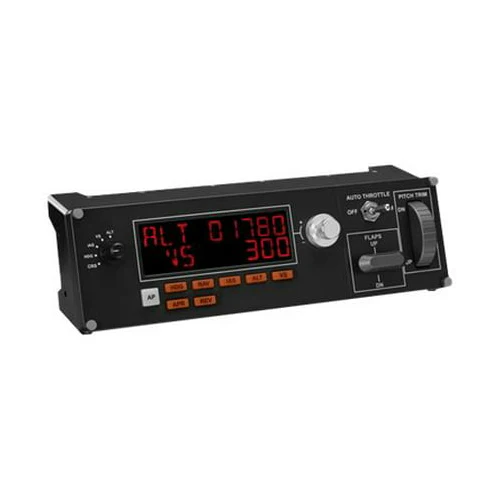
The Logitech G 945-000028 Flight Multi Panel features an LED display that works in real-time with major flight sim software. Integrated controls let you adjust frequency units as well as adjustment of throttle, flaps, and elevator trim. No finicky onscreen controls to deal with, it’s ready for installation into your Logitech G Flight Yoke System or custom cockpit rig. An integrated dial adjusts frequency units for quicker selection. Additional functions promote easy adjustment of your aircraft's throttle, flaps, and elevator trim.
Ready for Microsoft Flight Simulator
Take to the skies and experience the joy of flight in the next generation of Microsoft Flight Simulator, at its best on Logitech G flight equipment. Travel the world in amazing detail with over 37 thousand airports, 2 million cities, 1.5 billion buildings, real mountains, roads, trees, rivers, animals, traffic, and more. Test your piloting skills against the challenges of night flying, real-time atmospheric simulation, and live weather in a dynamic and living world. Your panel works with Windows 7, 8.1 and 10. A quick installation of a small plug-in from the support page adds compatibility with your favorite flight simulation software for PCs including Microsoft Flight Simulator, FSX - Flight Simulator X, X-Plane 10, and Prepar3D.
Trigger In-Sim Actions with a Touch
The full autopilot panel with real-time LED readouts gives you fingertip control over a bunch of settings within FSX, X-Plane, and Prepar3D software. No need to zoom into onscreen controls to make modifications. Add a Multi Panel to your flight sim setup and you can manipulate your aircraft's autopilot settings with physical dials and buttons
Precision Control at Any Altitude
It offers dedicated controls for key functions. Easily adjust aircraft controls like auto throttle, flaps, and pitch trim via an accurate 2-way rocker switch. For more precise control of pitch, a built-in trim wheel offers just the right amount of resistance and enables you to maintain your desired attitude.
Fully Customizable for All Flying Conditions
The Logitech G range of panels can be situated one on top of another or side-by-side. The easy-to-use mounting brackets provide the means to arrange your flight simulation setup in a configuration only limited by your imagination.
Simple Installation
Your panel works with Windows 7, 8.1 and 10 and, following the quick installation of a small plug-in from the support page, is compatible with your favorite flight simulation software for PCs including FSX - Flight Simulator X, X-Plane 10, and Prepar3D.
Product Information
Product Information
Shipping & Returns
Shipping & Returns




Logitech G 945-000028 Flight Multi Panel
Logitech G 945-000028 Flight Multi Panel
The Logitech G 945-000028 Flight Multi Panel features an LED display that works in real-time with major flight sim software. Integrated controls let you adjust frequency units as well as adjustment of throttle, flaps, and elevator trim. No finicky onscreen controls to deal with, it’s ready for installation into your Logitech G Flight Yoke System or custom cockpit rig. An integrated dial adjusts frequency units for quicker selection. Additional functions promote easy adjustment of your aircraft's throttle, flaps, and elevator trim.
Ready for Microsoft Flight Simulator
Take to the skies and experience the joy of flight in the next generation of Microsoft Flight Simulator, at its best on Logitech G flight equipment. Travel the world in amazing detail with over 37 thousand airports, 2 million cities, 1.5 billion buildings, real mountains, roads, trees, rivers, animals, traffic, and more. Test your piloting skills against the challenges of night flying, real-time atmospheric simulation, and live weather in a dynamic and living world. Your panel works with Windows 7, 8.1 and 10. A quick installation of a small plug-in from the support page adds compatibility with your favorite flight simulation software for PCs including Microsoft Flight Simulator, FSX - Flight Simulator X, X-Plane 10, and Prepar3D.
Trigger In-Sim Actions with a Touch
The full autopilot panel with real-time LED readouts gives you fingertip control over a bunch of settings within FSX, X-Plane, and Prepar3D software. No need to zoom into onscreen controls to make modifications. Add a Multi Panel to your flight sim setup and you can manipulate your aircraft's autopilot settings with physical dials and buttons
Precision Control at Any Altitude
It offers dedicated controls for key functions. Easily adjust aircraft controls like auto throttle, flaps, and pitch trim via an accurate 2-way rocker switch. For more precise control of pitch, a built-in trim wheel offers just the right amount of resistance and enables you to maintain your desired attitude.
Fully Customizable for All Flying Conditions
The Logitech G range of panels can be situated one on top of another or side-by-side. The easy-to-use mounting brackets provide the means to arrange your flight simulation setup in a configuration only limited by your imagination.
Simple Installation
Your panel works with Windows 7, 8.1 and 10 and, following the quick installation of a small plug-in from the support page, is compatible with your favorite flight simulation software for PCs including FSX - Flight Simulator X, X-Plane 10, and Prepar3D.
Product Information
Product Information
Shipping & Returns
Shipping & Returns
Description
The Logitech G 945-000028 Flight Multi Panel features an LED display that works in real-time with major flight sim software. Integrated controls let you adjust frequency units as well as adjustment of throttle, flaps, and elevator trim. No finicky onscreen controls to deal with, it’s ready for installation into your Logitech G Flight Yoke System or custom cockpit rig. An integrated dial adjusts frequency units for quicker selection. Additional functions promote easy adjustment of your aircraft's throttle, flaps, and elevator trim.
Ready for Microsoft Flight Simulator
Take to the skies and experience the joy of flight in the next generation of Microsoft Flight Simulator, at its best on Logitech G flight equipment. Travel the world in amazing detail with over 37 thousand airports, 2 million cities, 1.5 billion buildings, real mountains, roads, trees, rivers, animals, traffic, and more. Test your piloting skills against the challenges of night flying, real-time atmospheric simulation, and live weather in a dynamic and living world. Your panel works with Windows 7, 8.1 and 10. A quick installation of a small plug-in from the support page adds compatibility with your favorite flight simulation software for PCs including Microsoft Flight Simulator, FSX - Flight Simulator X, X-Plane 10, and Prepar3D.
Trigger In-Sim Actions with a Touch
The full autopilot panel with real-time LED readouts gives you fingertip control over a bunch of settings within FSX, X-Plane, and Prepar3D software. No need to zoom into onscreen controls to make modifications. Add a Multi Panel to your flight sim setup and you can manipulate your aircraft's autopilot settings with physical dials and buttons
Precision Control at Any Altitude
It offers dedicated controls for key functions. Easily adjust aircraft controls like auto throttle, flaps, and pitch trim via an accurate 2-way rocker switch. For more precise control of pitch, a built-in trim wheel offers just the right amount of resistance and enables you to maintain your desired attitude.
Fully Customizable for All Flying Conditions
The Logitech G range of panels can be situated one on top of another or side-by-side. The easy-to-use mounting brackets provide the means to arrange your flight simulation setup in a configuration only limited by your imagination.
Simple Installation
Your panel works with Windows 7, 8.1 and 10 and, following the quick installation of a small plug-in from the support page, is compatible with your favorite flight simulation software for PCs including FSX - Flight Simulator X, X-Plane 10, and Prepar3D.