Logitech Combo Touch Backlit Keyboard Case for 10th Gen 10.9-inch iPad (Oxford Gray)
Meet the Combo Touch keyboard Case that enables whole different levels of versatility. Type, view, write and sketch, and read on iPad. Do it while keeping the front, back, and corners snug and protected.
Discover What's Possible
Achieve more with the incredibly versatile Combo Touch keyboard case for iPad.
A Case That Clicks With
The ultimate case for iPad (10th gen) has just touched down. Combo Touch combines a large bottom-click trackpad with a full-size keyboard for the iPad. Full Multi-Touch gesture support transforms the iPad into a productivity machine for working in spreadsheets and docs, editing photos and videos, taking small classes, and more. The possibilities are endless.
Four Use Modes
Combo Touch has four use modes, Type, Sketch, View, and Read Mode, to help accomplish any task, anywhere.
Easy on Fingers
Over 20 years of typing innovation goes into every keyboard Logitech makes so keystrokes are fluid, natural, and accurate. Enjoy hours of comfortable typing thanks to large, well-spaced keys stretched edge-to-edge so the hands won't feel crowded. Logitech keyboards feature a scissor mechanism beneath each key to delivering the perfect bounce every time.
Leave The Keyboard Behind
Just detach the keyboard to sketch, read or watch videos without distractions. Then use the adjustable kickstand's 50-degree tilt to find that perfect viewing angle.
Premium Trackpad Experience
The high-precision trackpad gives more freedom, control, and accuracy to tackle tasks in apps such as Safari, Keynote, and Pages.
Adjustable Kickstand
The ultra-flexible kickstand offers an incredible 50-degree tilt, so one can always find the right angle for the task. A sturdy mechanical hinge ensures the kickstand stays firmly in place and does not collapse, even with strong tapping.
Secure Form-Fit Protection
It's not just protection. It's peace of mind. Combo Touch is molded to fit the iPad, protecting the front, back, and corners from scrapes and bumps.
Type Day or Night
Backlit keys automatically adjust to the environment with 16 levels of brightness to stay focused in any lighting. Shortcut keys at the keyboard's top allow adjusting brightness manually.
Complete Row of iPadOS Shortcut Keys
Forget hunting through on-screen menus. Combo Touch gets it done with a full row of iPadOS shortcut keys. Easily access media controls, brightness levels, Screenshots, Dictation, and more.
Power and Pair in One Click
Combo Touch instantly pairs with the iPad via Smart Connector. And batteries aren't included because it is never needed. The power is sourced directly from the iPad.
Home for Logitech Crayon
A built-in holder for Logitech Crayon or Apple Pencil keeps the digital pencil within reach. One can easily hand-write notes, sketch drawings, or markup documents directly on the iPad.
Perfectly Complements iPad
The iPad meets its aesthetic match with a clean, sleek design. It's the thinnest keyboard case we've ever designed with a trackpad.
Additional Features
Simply open Combo Touch to wake the iPad and turn the keyboard on. Then close it to put them both to sleep automatically.
Logitech Control App
For the best experience, keep the Combo Touch firmware up to date using the Logitech control app.
Product Information
Product Information
Shipping & Returns
Shipping & Returns


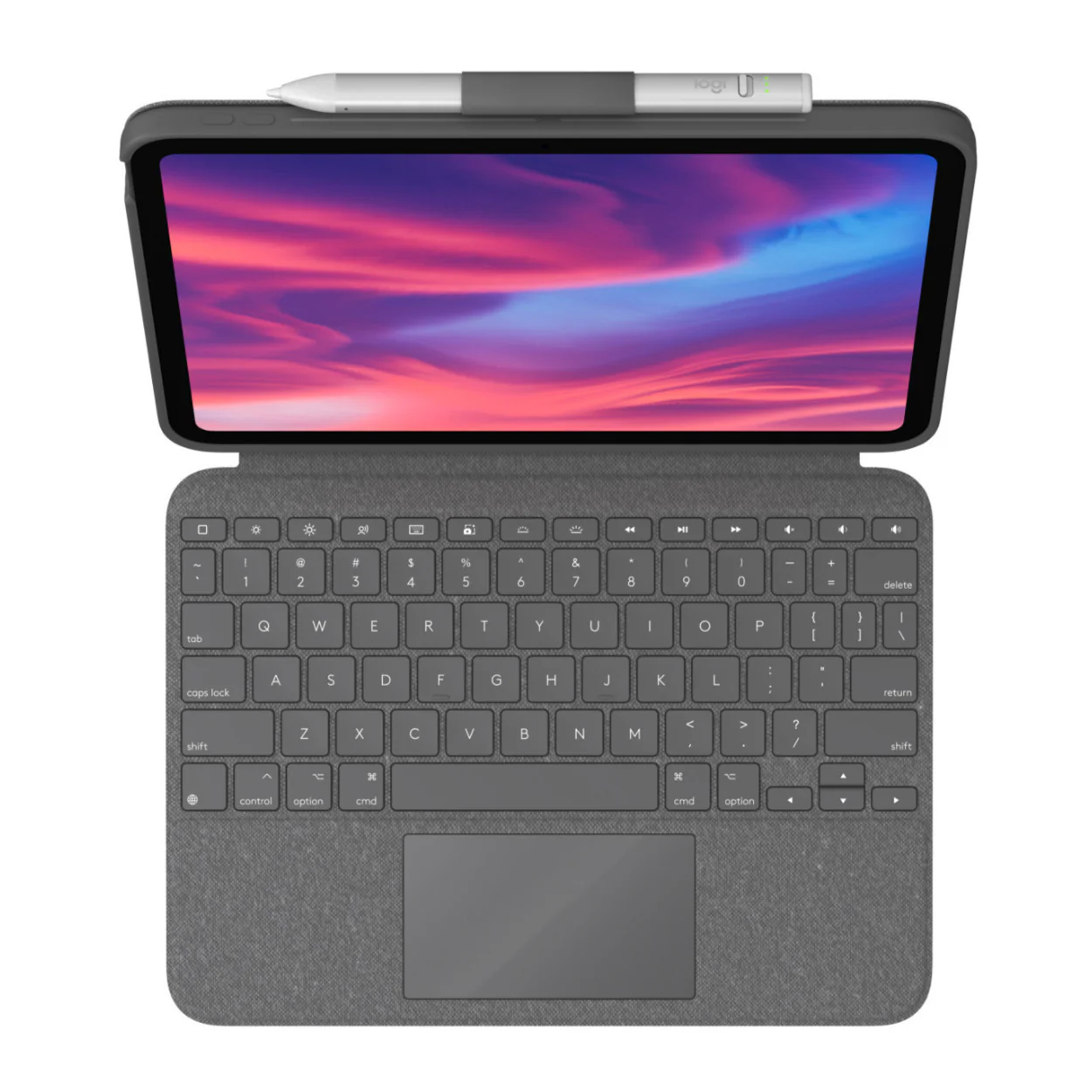


Logitech Combo Touch Backlit Keyboard Case for 10th Gen 10.9-inch iPad (Oxford Gray)
Logitech Combo Touch Backlit Keyboard Case for 10th Gen 10.9-inch iPad (Oxford Gray)
Meet the Combo Touch keyboard Case that enables whole different levels of versatility. Type, view, write and sketch, and read on iPad. Do it while keeping the front, back, and corners snug and protected.
Discover What's Possible
Achieve more with the incredibly versatile Combo Touch keyboard case for iPad.
A Case That Clicks With
The ultimate case for iPad (10th gen) has just touched down. Combo Touch combines a large bottom-click trackpad with a full-size keyboard for the iPad. Full Multi-Touch gesture support transforms the iPad into a productivity machine for working in spreadsheets and docs, editing photos and videos, taking small classes, and more. The possibilities are endless.
Four Use Modes
Combo Touch has four use modes, Type, Sketch, View, and Read Mode, to help accomplish any task, anywhere.
Easy on Fingers
Over 20 years of typing innovation goes into every keyboard Logitech makes so keystrokes are fluid, natural, and accurate. Enjoy hours of comfortable typing thanks to large, well-spaced keys stretched edge-to-edge so the hands won't feel crowded. Logitech keyboards feature a scissor mechanism beneath each key to delivering the perfect bounce every time.
Leave The Keyboard Behind
Just detach the keyboard to sketch, read or watch videos without distractions. Then use the adjustable kickstand's 50-degree tilt to find that perfect viewing angle.
Premium Trackpad Experience
The high-precision trackpad gives more freedom, control, and accuracy to tackle tasks in apps such as Safari, Keynote, and Pages.
Adjustable Kickstand
The ultra-flexible kickstand offers an incredible 50-degree tilt, so one can always find the right angle for the task. A sturdy mechanical hinge ensures the kickstand stays firmly in place and does not collapse, even with strong tapping.
Secure Form-Fit Protection
It's not just protection. It's peace of mind. Combo Touch is molded to fit the iPad, protecting the front, back, and corners from scrapes and bumps.
Type Day or Night
Backlit keys automatically adjust to the environment with 16 levels of brightness to stay focused in any lighting. Shortcut keys at the keyboard's top allow adjusting brightness manually.
Complete Row of iPadOS Shortcut Keys
Forget hunting through on-screen menus. Combo Touch gets it done with a full row of iPadOS shortcut keys. Easily access media controls, brightness levels, Screenshots, Dictation, and more.
Power and Pair in One Click
Combo Touch instantly pairs with the iPad via Smart Connector. And batteries aren't included because it is never needed. The power is sourced directly from the iPad.
Home for Logitech Crayon
A built-in holder for Logitech Crayon or Apple Pencil keeps the digital pencil within reach. One can easily hand-write notes, sketch drawings, or markup documents directly on the iPad.
Perfectly Complements iPad
The iPad meets its aesthetic match with a clean, sleek design. It's the thinnest keyboard case we've ever designed with a trackpad.
Additional Features
Simply open Combo Touch to wake the iPad and turn the keyboard on. Then close it to put them both to sleep automatically.
Logitech Control App
For the best experience, keep the Combo Touch firmware up to date using the Logitech control app.
Original: $159.99
-65%$159.99
$56.00Product Information
Product Information
Shipping & Returns
Shipping & Returns
Description
Meet the Combo Touch keyboard Case that enables whole different levels of versatility. Type, view, write and sketch, and read on iPad. Do it while keeping the front, back, and corners snug and protected.
Discover What's Possible
Achieve more with the incredibly versatile Combo Touch keyboard case for iPad.
A Case That Clicks With
The ultimate case for iPad (10th gen) has just touched down. Combo Touch combines a large bottom-click trackpad with a full-size keyboard for the iPad. Full Multi-Touch gesture support transforms the iPad into a productivity machine for working in spreadsheets and docs, editing photos and videos, taking small classes, and more. The possibilities are endless.
Four Use Modes
Combo Touch has four use modes, Type, Sketch, View, and Read Mode, to help accomplish any task, anywhere.
Easy on Fingers
Over 20 years of typing innovation goes into every keyboard Logitech makes so keystrokes are fluid, natural, and accurate. Enjoy hours of comfortable typing thanks to large, well-spaced keys stretched edge-to-edge so the hands won't feel crowded. Logitech keyboards feature a scissor mechanism beneath each key to delivering the perfect bounce every time.
Leave The Keyboard Behind
Just detach the keyboard to sketch, read or watch videos without distractions. Then use the adjustable kickstand's 50-degree tilt to find that perfect viewing angle.
Premium Trackpad Experience
The high-precision trackpad gives more freedom, control, and accuracy to tackle tasks in apps such as Safari, Keynote, and Pages.
Adjustable Kickstand
The ultra-flexible kickstand offers an incredible 50-degree tilt, so one can always find the right angle for the task. A sturdy mechanical hinge ensures the kickstand stays firmly in place and does not collapse, even with strong tapping.
Secure Form-Fit Protection
It's not just protection. It's peace of mind. Combo Touch is molded to fit the iPad, protecting the front, back, and corners from scrapes and bumps.
Type Day or Night
Backlit keys automatically adjust to the environment with 16 levels of brightness to stay focused in any lighting. Shortcut keys at the keyboard's top allow adjusting brightness manually.
Complete Row of iPadOS Shortcut Keys
Forget hunting through on-screen menus. Combo Touch gets it done with a full row of iPadOS shortcut keys. Easily access media controls, brightness levels, Screenshots, Dictation, and more.
Power and Pair in One Click
Combo Touch instantly pairs with the iPad via Smart Connector. And batteries aren't included because it is never needed. The power is sourced directly from the iPad.
Home for Logitech Crayon
A built-in holder for Logitech Crayon or Apple Pencil keeps the digital pencil within reach. One can easily hand-write notes, sketch drawings, or markup documents directly on the iPad.
Perfectly Complements iPad
The iPad meets its aesthetic match with a clean, sleek design. It's the thinnest keyboard case we've ever designed with a trackpad.
Additional Features
Simply open Combo Touch to wake the iPad and turn the keyboard on. Then close it to put them both to sleep automatically.
Logitech Control App
For the best experience, keep the Combo Touch firmware up to date using the Logitech control app.